GitLab 访问出现502排错
错误现象
访问Gitlab Web 页面提示502错误
排错思路
1.通过Git命令查询服务状态,发现postgresql 服务down掉;
[root@Gitlab-server ~]# gitlab-ctl status
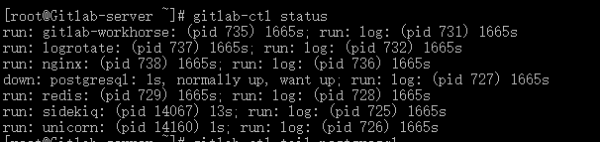
2.紧接着查看postgresql服务日志,提示没有空间可写;
[root@Gitlab-server ~]#gitlab-ctl tail postgresql
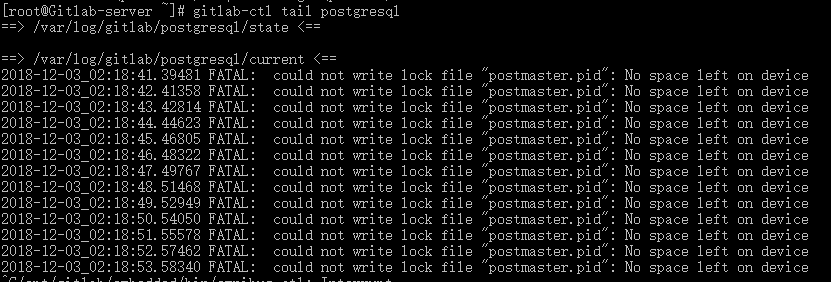
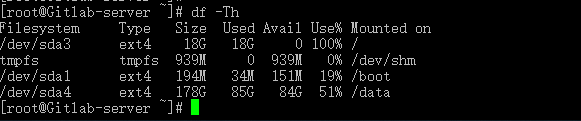
3.查看分区空间,发现”/”分区占满;
[root@Gitlab-server ~]#df -Th
解决方法
清除或者扩充“/”分区后问题解决。
暂无评论
发表评论
[annotate]术语||注释[/annotate]悬停术语注释[blur]模糊文本[/blur]高斯模糊[black]黑幕文本[/black]黑幕遮挡[img]图片地址[/img]内嵌图片[b]粗体[/b] [i]斜体[/i] [s]删除线[/s] [u]下划线[/u]文字样式[url=链接地址]文字[/url]超链接[quote]引用内容[/quote]引用块[h1]~[h5]标题[/h1]~[/h5]多级标题